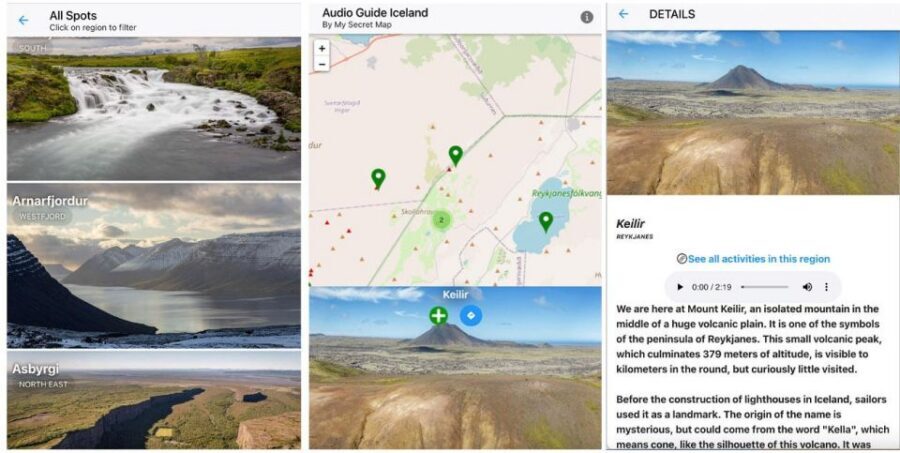
Stories follow you around Iceland. This audioguide turns Iceland into a moving story with 200+ spots and an interactive geolocation map that helps you find the next stop. I love the geolocation map and the 5 hours of audio; the only real catch is you need continuous internet for the map, itinerary, and downloads.
You’re not dealing with a strict group schedule. You control the pace, and the app includes audio plus full text transcripts, along with photo spot recommendations so you know where to stand before you start clicking.
MySecretMap (the provider) makes it easy to start anywhere in the Capital Region area, because there’s no pickup point. One good sign from a recent review: when a user hit an access problem due to a personal mistake, they received a new access right away. Price-wise, it’s $17 per group up to 6, which is solid value if you’ll actually use the audio and map.
In This Review
- Quick reasons this audioguide works
- A Map-First Audioguide Built for Iceland Road Days
- Price and access: $17 per group up to 6, for 365 days
- Getting started on iPhone or Android without the stress
- How the Interactive Geolocation Map Keeps You on Track
- 200++ spots and 5+ hours of audio: what your day sounds like
- What to expect at each stop type
- Itinerary suggestions that connect spots your way
- Transcripts and text notes for fast replays
- Photo pointers that save you time on location
- Practical checklist: internet, battery, and local reality checks
- Who this Iceland audioguide is best for
- Should you book this Iceland audioguide app?
- FAQ
- What languages are included in the audioguide?
- How many locations does the guide cover?
- How much audio content is included?
- Does the app include an interactive map?
- Do I need an internet connection?
- When will I receive the app installation instructions after booking?
- Are transcripts included along with the audio?
- Is there a pickup location or meeting point?
- Is the app available on both iPhone and Android?
- Is this experience wheelchair accessible?
Quick reasons this audioguide works
- Geolocation map means less time guessing where you are and more time listening
- 5+ hours of audio covers sagas, geysers, Northern Lights, and more
- 200++ spots range from big names to quieter stops outside the rush
- Audio plus transcripts lets you replay and skim without losing context
- Photo guidance helps you line up shots without wandering around blind
A Map-First Audioguide Built for Iceland Road Days

This is an app-based Iceland audioguide experience designed for self-guided travel. The core idea is simple: you travel at your own speed, but the app gives you the context that’s usually missing when you just park, walk, and point your phone at scenery.
The “map + audio” combo matters more than it sounds. Iceland is big on long drives and quick stops, and it’s easy to waste time backtracking or misreading turnoffs. With a geolocation map, you spend less effort figuring out where you are and more effort paying attention to what you’re seeing.
I also like that it’s not only audio. You get full textual transcripts of the stories, so you can read along when you want details, or when you’re standing somewhere loud and audio is harder to hear.
You can also read our reviews of more tours and experiences in Iceland.



Price and access: $17 per group up to 6, for 365 days
At $17 per group (up to 6 people), this can be a bargain for families or small groups who share one phone. If you’re traveling solo, the value still makes sense because you’re essentially buying one guide that you can use across many stops, instead of paying for separate guided tours.
The access length is also a big deal: it runs for 365 days. That means you can book, then adjust your trip plans without panic. It also gives you a safety net if you don’t get everything done in one tight window, since the guide can keep serving you later.
One more practical point: there’s no pickup location. You can use it wherever you are, which is ideal in Iceland where “meeting points” can be more work than they’re worth.
Getting started on iPhone or Android without the stress
After booking, you get an email with instructions to install the app. The instructions email might take up to 24 hours to arrive, so don’t wait until you’re already at the car with no plan.
The app is available on iPhone and Android. You’ll want your phone charged before you leave the hotel, because the guide expects you to use geolocation and map features while you’re out moving around.
For audio, headphones or car audio connectivity is advised. That’s not a small detail in Iceland, because you’ll often be outside, with wind and background noise. If you’ve got a passenger, car audio can be easier than everyone sharing one tiny speaker.
How the Interactive Geolocation Map Keeps You on Track
The interactive map with real-time geolocation is the backbone of the experience. You’ll use it to plot your journey from one spot to another, rather than relying on memory or screenshots.
This is also where the “know where you are” promise becomes practical. Iceland roads can be confusing, and parking lots can look identical. Geolocation helps you confirm you’re at the right place before you start listening, which keeps the stories from becoming a random audio playlist.
Important: continuous internet access is essential. The map, itinerary, and downloadable media all depend on it, so plan for data and coverage. If you’re the type who saves your phone battery by turning data off, you’ll want to adjust, because this guide is not designed to work offline.
200++ spots and 5+ hours of audio: what your day sounds like
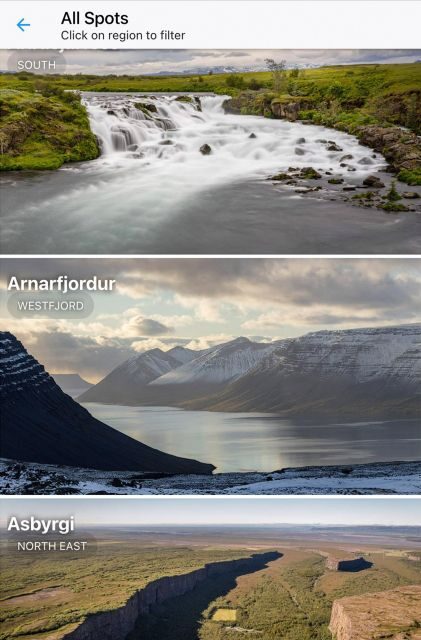
You’re not limited to only famous attractions. The guide covers 200++ unique spots, ranging from well-known places to secluded treasures. It’s structured so you can connect multiple points in a route, instead of treating each stop like a one-off.
Audio content runs to more than 5 hours, and the topics are broad enough to feel like you’re learning something in real time. You’ll hear Icelandic sagas and legends, plus science behind geysers. It also includes stories linked to the magic people associate with the Northern Lights.
The way this helps you as a traveler is context. Iceland can feel like pure spectacle if you don’t have a thread connecting what you see. These stories give that thread, whether you’re standing by something steaming, looking at a sky-watching scene, or reading the land through its geology.



What to expect at each stop type
Because the guide contains 200+ locations, you’ll experience it as a mix of story categories rather than one fixed “day tour.” Here’s how to think about it while you’re using it:
- Iconic nature stops tend to come with both explanation and story, so you can appreciate what’s happening, not just photograph it.
- Geology and thermal areas are framed with the science behind geysers and related natural processes, which makes repeat visits feel less repetitive.
- Cultural and legend-led stops add saga and folklore context, which helps you connect the dots between places and Iceland’s storytelling tradition.
- Northern Lights planning moments are best treated as motivation plus context. You still need to check local conditions and advisories before going out, because skies don’t follow schedules.
- Smaller, quieter locations are where you’ll likely notice the value of having narration, since you won’t get much interpretation from nearby signs.
The downside to expect is also simple: Iceland is weather-dependent, and the guide is not a weather app. You’ll get storytelling and navigation help, but you’ll still need to make smart decisions on whether it’s safe and practical to go.
Itinerary suggestions that connect spots your way
The app doesn’t just tell you where things are. It provides itinerary guidance to connect different spots, which helps you avoid wasting time driving in circles.
You’ll see options that match different goals, like connecting points by most scenic route or by quicker routing. That matters in Iceland because time is often the scarcest resource, especially when daylight is limited.
Also, since the map uses geolocation, the itinerary suggestions feel more relevant. Instead of planning a day on paper, you can adjust in the moment based on where you actually are and what’s realistic for the time you have left.
Transcripts and text notes for fast replays
A lot of audioguides are audio-only. Here, you get full textual transcripts alongside the stories.
That’s genuinely useful in Iceland. Sometimes you’ll want to replay a specific section without listening to the whole thing again. Other times, reading a short explanation right after you hear it helps it stick, especially with geology and technical-sounding material.
Text also makes it easier to share the experience. If you’re with someone who doesn’t want to wear headphones the whole time, you can point out a key passage from the transcript and still keep moving.
Photo pointers that save you time on location
One included bonus is recommendations for best photo opportunities. That means you don’t just arrive, look around, and hope you picked the best angle.
In practice, this can cut down on wasted time. Iceland spots can be tricky: light changes fast, and you may only have a short window before clouds shift or the weather turns.
If you’re a photographer, these pointers are worth paying attention to. Even casual photo takers benefit, because it nudges you toward a better position before you start shooting.
Practical checklist: internet, battery, and local reality checks
Here’s what you should plan for before you rely on the app all day.
You must have internet. Continuous connection is needed for the map, itinerary, and downloading media. If you’re driving with weak coverage, this could be the part that slows you down.
Bring a charged smartphone. And if you’re using geolocation heavily, bring a portable charger. This isn’t just comfort. It’s what keeps navigation and audio working.
For safety and practicality: the guide provides itineraries, but you should always check local conditions and advisories before heading out. Iceland can change quickly, and the smartest route in an app can still be a bad choice if the weather is turning.
Finally, if you want maximum audio quality, use headphones or connect to your car audio. You’ll get more enjoyment and less frustration when wind noise isn’t competing with the narration.
Who this Iceland audioguide is best for
This works especially well if you like structure without losing freedom. It’s a fit for road-trippers who want context at each stop, and for groups of up to six people sharing one purchase.
It’s also a strong option for first-time Iceland visitors. The audio covers major themes people care about (geysers, sagas, Northern Lights) and it helps you understand what you’re seeing instead of treating everything as a checklist.
If you’ve been to Iceland already, you might still appreciate it. The guide includes 200++ spots and includes quieter locations beyond the main tourist routes, which can help you find new things on a repeat trip.
And if you’re the type who hates strict schedules, this is built for that. There’s no pickup point, no single route you must follow, and a 365-day access window.
Should you book this Iceland audioguide app?
If you’re okay with the tradeoff of needing continuous internet, I think it’s a strong value. The $17 per group up to 6 price is reasonable for something that can power multiple days of stop-by-stop storytelling, map navigation, and photo guidance.
I would skip it if you’re planning on going off-grid with limited data for long stretches. The app is designed to rely on live connection for core features, so a “mostly offline” strategy will fight the system.
Book it if you want an Iceland guide that helps you connect the drive with the story. Skip it if you want a set schedule and offline-only reliability.
FAQ
What languages are included in the audioguide?
The audioguide is available in German, French, and English.
How many locations does the guide cover?
It covers 200++ unique Icelandic spots.
How much audio content is included?
You get more than 5 hours of immersive audio content.
Does the app include an interactive map?
Yes. It includes an interactive map with real-time geolocation.
Do I need an internet connection?
Yes. Continuous internet access is essential to use the map, itinerary, and download media.
When will I receive the app installation instructions after booking?
After booking, you’ll receive an email with instructions to install the app, and it might take up to 24 hours to arrive.
Are transcripts included along with the audio?
Yes. Full textual transcripts are provided for all audio content.
Is there a pickup location or meeting point?
No. There is no pickup location, and you can use the guide everywhere.
Is the app available on both iPhone and Android?
Yes. The app is available for iPhone and Android.
Is this experience wheelchair accessible?
Yes. It is wheelchair accessible.